
What Is a Notion Clock Widget?
A Notion clock widget is a real-time clock you can embed directly inside your Notion pages using the /embed block. It helps you stay time-aware while working, studying, or planning your day — something Notion doesn’t offer natively.
This widget updates automatically and works seamlessly inside any Notion workspace.
Why Use This Clock Widget for Notion?
This clock widget is designed specifically for Notion users who want both functionality and aesthetics.
Key benefits:
Live real-time clock updates
Multiple clock styles (digital, flip, analog, retro)
Clean, distraction-free design
No login, no setup, no watermark
100% free to use
Whether you’re building a productivity dashboard or an aesthetic setup, this Notion clock fits perfectly.
Features of the Notion Clock Widget
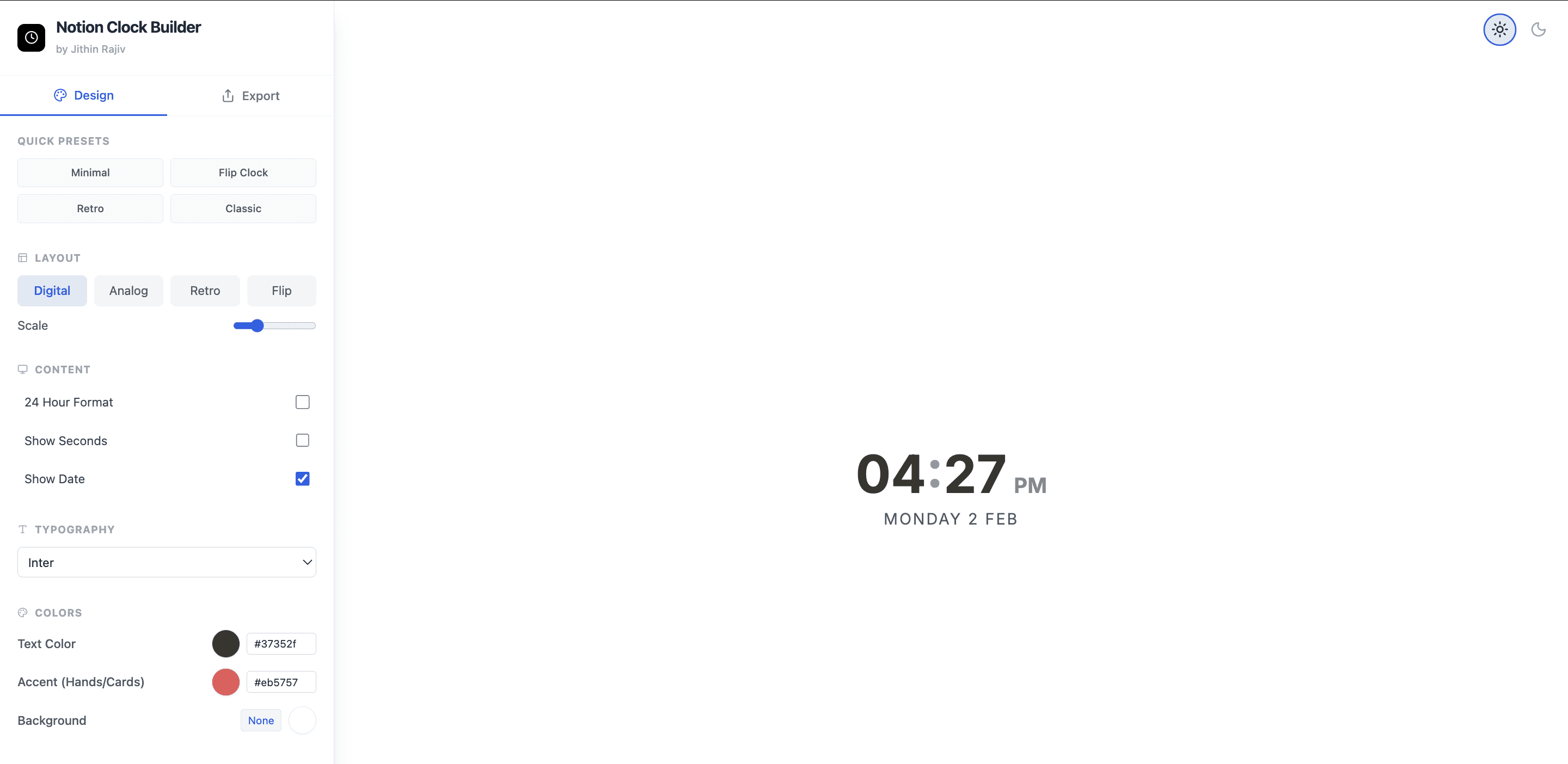
Multiple Clock Styles
Choose the style that matches your dashboard:
Digital clock for clean productivity layouts
Flip clock widget for Notion for aesthetic and focus dashboards
Analog clock for a classic look
Retro clock for vintage designs
Quick Design Presets
Instantly apply ready-made designs:
Minimal
Flip Clock
Retro
Classic
Switch styles in one click — no design skills required.
Real-Time Clock
Updates automatically
No refresh needed
Accurate and lightweight
Your Notion clock widget always stays in sync.
Time & Date Controls
Customize how time appears:
12-hour or 24-hour format
Optional seconds display
Optional date display
Perfect for daily planners, study dashboards, and workspaces.
Typography & Color Customization
Match your Notion theme easily:
Font selection (e.g., Inter)
Custom text color
Accent color (hands / flip cards)
Optional transparent background
Works beautifully with both light and dark dashboards.
Responsive & Scalable
Adjustable size using scale control
Mobile-friendly
Fits any Notion layout
One-Click Export for Notion
Export instantly
Paste using
/embedin NotionNo installation required
Notion Flip Clock Widget (Aesthetic Mode)
Looking specifically for a Notion flip clock widget?
This widget includes a flip-style digital clock that’s ideal for:
Aesthetic dashboards
Focus and deep-work setups
Time-blocking systems
Minimal Notion pages
The flip clock updates in real time and blends perfectly with modern Notion designs.
How to Add the Clock Widget to Notion
Open the clock widget builder
Customize your clock style
Click Export and copy the embed URL
In Notion, type
/embedand paste the link
Your clock widget for Notion is live in seconds.
Who Is This Notion Clock Widget For?
This widget is perfect for:
Students managing study time
Creators building aesthetic dashboards
Freelancers organizing daily work
Anyone who wants a real-time clock inside Notion
Is This Notion Clock Widget Free?
Yes.
This is a free Notion clock widget with:
No login
No watermark
No hidden paywalls
Frequently Asked Questions
Does Notion have a built-in clock?
No. Notion doesn’t offer a native real-time clock, which is why external clock widgets are commonly used.
Is there a Notion flip clock widget?
Yes. This widget includes a flip-style digital clock designed specifically for Notion dashboards.
Does the clock update in real time?
Yes, the clock updates automatically without refreshing the page.
Does this work on mobile?
Yes, it works on Notion mobile, though the desktop experience is best.
Is this widget safe to embed in Notion?
Yes. It uses Notion’s official embed feature and is safe to use.
Notion Clock Widget
Add a clean, real-time Notion clock widget to your dashboard. Choose from digital, flip, analog, or retro clock styles — fully customizable and completely free.
FREE
More Widgets
Notion Calendar Widget
Get for FREE
Free
Notion Clock Widget
Add a clean, real-time Notion clock widget to your dashboard. Choose from digital, flip, analog, or retro clock styles — fully customizable and completely free.
Get for FREE
Free