
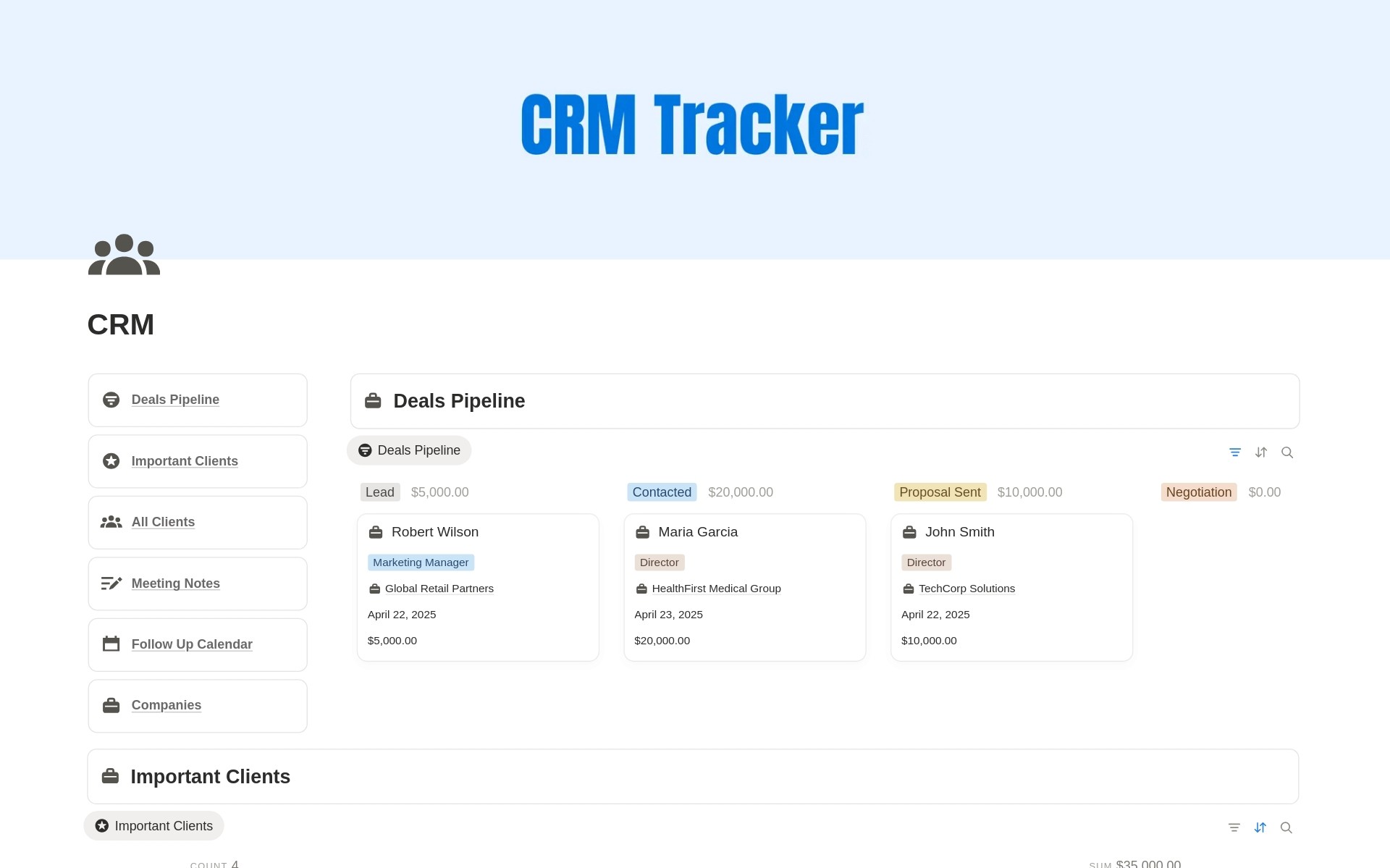
Deals Pipeline
Track every opportunity through your sales process with a visual pipeline that makes it easy to see which deals need attention.
Client Database
Keep client and prospect details, deal values, contact information, follow-up dates, and notes organized in one place.
Company Tracker
Manage companies alongside individual contacts and keep important business information connected to your client relationships.
Follow-Up Calendar
See upcoming follow-ups and next actions in one calendar so leads and client conversations never slip through the cracks.
Meeting Notes
Keep meeting details, discussion notes, action items, and next steps organized alongside your client workflow.
Important Clients
Highlight priority and high-value clients so your most important relationships are always easy to find and manage.
Is Notion a CRM?
How do I use Notion as a CRM?
Who is this Notion CRM template for?
Can I use this Notion CRM for sales tracking?
Can I customize the CRM template?
Does the template include a client database?
Does the Notion CRM include follow-up tracking?
Do I need any integrations to use this CRM?
Is a Notion CRM better than traditional CRM software?
What is included in this Notion CRM template?
One-time purchase. Lifetime access.
Perfect if you only need this template only
Buy Now
Instant Duplicate Link after Purchase
Step by step guide included
Free future template updates
Beginner friendly structure
Instant Notion access link delivered via Gumroad email receipt.
BESTSELLER
Every premium template I've created, including the CRM Tracker
Best if you want a complete notion bundle
Includes all current & future templates, delivered via Gumroad.
One-time payment. Lifetime access.
KPI Tracker for Content Creators
Technical SEO Audit Checklist
SEO Backlink Tracker
Ultimate Content Creator OS
2026 Life Planner
Knowledge Base & Help Center
2026 Goal Tracker
Daily Planner with Time Blocking
Personal Portfolio Website for Designers & Developers
CRM Tracker
Professional Resume & CV | Modern & ATS-Friendly
2026 Vision Board with Goals
2026 Expense Tracker - Monthly Expense Tracker
2025 Yearly Goal Tracker Vision Board
Daily Planner, Weekly Planner & Monthly Planner
Daily OS - Daily Planner
Christmas Gifts Planner & Tracker
Personal Portfolio & Resume for Job Seekers
Digital Product Pricing Calculator
100+ SEO AI Prompts
On-Page SEO Checklist for Blogs & Landing Pages
Internship Applications Tracker
Side Hustle & Passive Income Ideas
COMPLETE BUNDLE
A Simple Notion CRM for Managing Clients and Sales
Managing leads and clients across spreadsheets, notes, calendars, and different apps can quickly become difficult to maintain. This Notion CRM template brings your client information, sales opportunities, meetings, and follow-ups together in one customizable workspace.
Instead of building a CRM from scratch, duplicate the template into your Notion workspace and start organizing your sales process immediately.
Use the CRM to track new leads, manage active clients, monitor deal values, move opportunities through your sales pipeline, schedule follow-ups, and keep important meeting notes connected to each relationship.
Manage Your Sales Pipeline in Notion
The Deals Pipeline gives you a clear overview of every active sales opportunity.
You can move deals through stages such as Lead, Contacted, Proposal Sent, Negotiation, and Closed so you always know where an opportunity stands and what needs to happen next.
Tracking deals visually makes it easier to identify opportunities that need attention and maintain a consistent sales process without relying on complicated CRM software.
Keep Your Client Information Organized
The Client Database gives you one central place for your leads, prospects, and existing clients.
Store important information such as contact details, deal stages, deal values, notes, and follow-up dates so you do not have to search through emails, documents, or spreadsheets every time you need client information.
Because the CRM is built in Notion, you can customize the database properties and views to fit the way your business works.
Never Miss an Important Follow-Up
Following up consistently is an important part of maintaining client relationships and closing sales.
The built-in Follow-Up Calendar helps you keep upcoming conversations and next actions visible. Set a follow-up date for a lead or client and use the calendar to quickly see who you need to contact next.
This gives freelancers and small businesses a simple way to manage follow-ups without maintaining another separate calendar or sales tool.
Keep Meetings Connected to Your CRM
Client conversations often contain important information that can easily become scattered across different notes and documents.
The Meeting Notes section gives you a structured place to record meeting topics, attendees, notes, action items, and next steps.
Keeping this information inside your Notion CRM makes it easier to understand the complete history of a client relationship and know what needs to happen next.
Who Is This Notion CRM Template For?
This Notion CRM template is designed for people who want a flexible client management system without the complexity of enterprise CRM software.
It works particularly well for freelancers managing prospects and projects, consultants maintaining long-term client relationships, solopreneurs handling their own sales pipeline, creators managing partnerships and sponsors, coaches organizing prospective clients, and small businesses that need a lightweight sales CRM.
Why Use Notion as a CRM?
Traditional CRM software can provide powerful automation, reporting, and integrations, but those features can be unnecessary for smaller businesses with straightforward sales processes.
Using Notion as a CRM gives you more control over how your workspace is organized.
You can customize sales stages, database properties, views, labels, and workflows without rebuilding your entire system around the limitations of another platform.
If you already use Notion for your work, keeping your CRM inside the same workspace can also reduce the number of tools you need to manage.
Start Managing Your Clients in Notion
You do not need complicated software to keep your client relationships organized.
With this Notion CRM template, you can manage leads, organize client information, track deals, schedule follow-ups, and keep meeting notes together in one clean workspace.
Duplicate the template, customize it for your workflow, and start building a simpler client management system in Notion.